
Travel Budget Workbook for African Creators & Entrepreneurs
Track trips, multi-currency expenses, and content income in one workbook. Built for African creators, entrepreneurs, and anyone building a life across the continent.
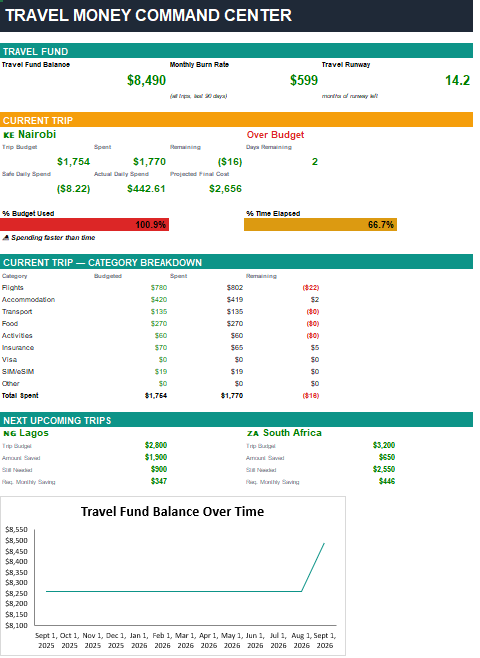
You have the money. You just don’t know how long it lasts.
There’s travel money sitting in a savings account. There are trips booked, or trips you’re dreaming about. What there usually isn’t, is a clear answer to the three questions that actually matter:
- How much travel money do I have right now?
- How fast am I burning through it?
- Is the trip I’m on, or the one I’m planning, actually paid for?
A spreadsheet full of expenses won’t tell you any of that. The Travel Money Command Center will. It’s a small financial model built for travelers, not a packing list with a sum at the bottom.
Built for African creators & entrepreneurs
A growing wave of African creators is showing the continent to itself and to the world. More people are traveling intra-Africa for business, scouting relocation, documenting the journey, and building income from content. That comes with a money problem that no generic travel app solves: earning in one currency, spending in another, and trying to figure out whether the trip actually paid for itself.
This workbook was designed for exactly that. It handles:
- Multi-currency trips. Bill in USD or GBP, spend in KES, GHS, NGN, UGX, ZAR, RWF, XOF, and more.
- Content income tracking. Log YouTube ad revenue, sponsorships, affiliate income, Patreon, and digital product sales against each trip.
- Real net trip cost. See what a trip cost after the content income it generated.
- Fund runway. Know how many more months of travel your savings can fund, at your real burn rate.
- Business travel and relocation scouting. Not just creator trips. Any trip where the numbers matter.
- Works offline. Excel and Google Sheets, no app, no account, no subscription.
What it does
What makes this different
Most travel budget templates are expense logs with a sum at the bottom. This one is built like a small financial model, and it’s designed to fail loudly instead of quietly.
- Runway math, not just totals. The same logic used in startup finance, applied to your travel fund.
- Two burn rates. All-trips and current-trip-only, so you can see both the long-run picture and what this trip is actually costing you per month.
- Creator economics built in. Most travel templates ignore the fact that a trip can pay for itself. This one doesn’t.
- Dropdown validation. Typos get rejected, not silently absorbed into a broken lookup.
- Orphan-trip detection. If a trip name on the Creator Income tab doesn’t match the Trips tab, it flags in red instead of vanishing from your totals.
- Multiple-Current guard. If more than one trip is marked “Current,” the Dashboard warns you before the numbers get confusing.
- Documented end-to-end. A Start Here tab explains every cell, the color key, and the assumptions baked into the formulas. You never have to reverse-engineer a formula.
Who it’s for, and who it isn’t
Built for
- African creators documenting travel across the continent
- Entrepreneurs and consultants traveling for business between Lagos, Accra, Nairobi, Kigali, Cape Town and beyond
- Diaspora Africans planning relocation or extended stays
- Freelancers and remote workers earning in one currency and spending in another
- Anyone funding multiple trips from a dedicated savings pot
Not for
- People who want an app that syncs to their bank. This is a spreadsheet, not a fintech product
- Buyers who need auto currency conversion — you supply the rate
- Anyone who wants a packing list. This is about the money, not the gear.
What’s included
| Item | What it is |
|---|---|
| Travel Money Command Center v1.1 | The full Excel workbook (.xlsx). Clean, ready for your own data. |
| EXAMPLE copy | A duplicate with a worked example trip intact — flights, accommodation, food, transport, and content income — so you can see exactly how it’s meant to be filled in before you clear it. |
| Start Here tab | Plain-English guide to every tab, the color key, and the assumptions behind the formulas. |
| Changelog tab | Version history, so you know what you have and what’s next. |
Details
| Format | Excel .xlsx — two files (clean + worked example) |
|---|---|
| Tabs | Dashboard, Start Here, Trips, Expense Tracker, Travel Fund, Creator Income, Changelog |
| Capacity | Up to 10 trips · 98 expense lines · 98 creator income lines · 20 fund contributions |
| Currencies | Any. Ships with defaults for CAD, USD, EUR, GBP, JPY, THB, ZAR, AUD, NZD, MXN. Add GHS, KES, NGN, UGX, RWF, XOF, or any other in one row. |
| Compatibility | Excel for Windows, Excel for Mac, Google Sheets |
| Macros | None |
| Delivery | Instant digital download. No physical item will be shipped. |
A note on currency. The workbook is labeled in CAD by default, but nothing is hardcoded. Rename the base currency label wherever you see it, and log expenses in any currency you actually paid in — GHS, KES, NGN, UGX, ZAR, RWF, XOF, USD, GBP, EUR, and more. You supply the exchange rate per expense line. The workbook doesn’t guess, and it never silently converts.
Frequently asked
Stop guessing. Start knowing.
One workbook. Every trip in one place. A runway number you can actually plan against.
Instant download · Excel & Google Sheets · No subscription · All sales final on digital downloads
Questions before you buy? Email info@metricsuite.tools. MetricSuite builds small, sharp financial tools for people building across Africa.