

How to Legally Invoice a Client Without a Registered Business: The Freelancer’s Guide
You’re landing clients. You’re delivering work. But when it comes time to invoice, you hit a wall: Can you actually invoice without a registered business? The answer is yes, but you need to do it right.
Most freelancers start without formal business registration. Sole proprietorships in the US, for example, don’t require legal registration to operate. Yet many freelancers stay stuck between treating their work as a hobby and formalizing it as a business. Invoicing without proper documentation leaves you vulnerable to payment disputes, tax trouble, and lost credibility with clients.
This guide walks you through invoicing legally as an unregistered freelancer—and introduces a free tool that makes the process bulletproof in minutes.
Need a Freelancer for This?
Hire verified talent on Fiverr — starting from $5. No contracts, no hassle.
Browse Fiverr Freelancers →Why Invoicing Without a Registered Business Creates Problems
You’re not starting from zero. According to freelancing platforms, 28% of independent workers operate without formal business registration. But operating without documentation doesn’t mean operating outside the law. It means operating in a gray zone where one mistake can cost you money or clients.
The Real Costs of Getting It Wrong
Payment disputes escalate fast. A client without an invoice can claim they never received a statement of work. A vague invoice opens the door to payment negotiation—”I thought $2,000 included revisions.” A missing tax ID can trigger payment holds on platforms like Stripe.
You lose credibility without professional documentation. Clients want to know who they’re paying and why. A sloppy invoice signals amateur work, even if your deliverables are excellent.
Tax season becomes a nightmare. If you can’t produce clear invoices, the IRS will struggle to verify your income. If you’re audited and lack documentation, the burden falls on you to reconstruct transactions. Many freelancers discover they’ve underpaid taxes simply because they didn’t track invoices properly.
Late payments are harder to enforce. Without a formal invoice that includes payment terms, due dates, and late fees, clients have no incentive to pay on time. One 2023 study found that freelancers with formal invoicing processes received payment 6 days faster on average.
The Legal Landscape: What You Actually Need to Invoice Legally
Let’s be clear: you don’t need a registered business to invoice. In most jurisdictions, a sole proprietorship is legally valid the moment you start offering services. But your invoice must still meet certain standards.
What Makes an Invoice Legally Valid?
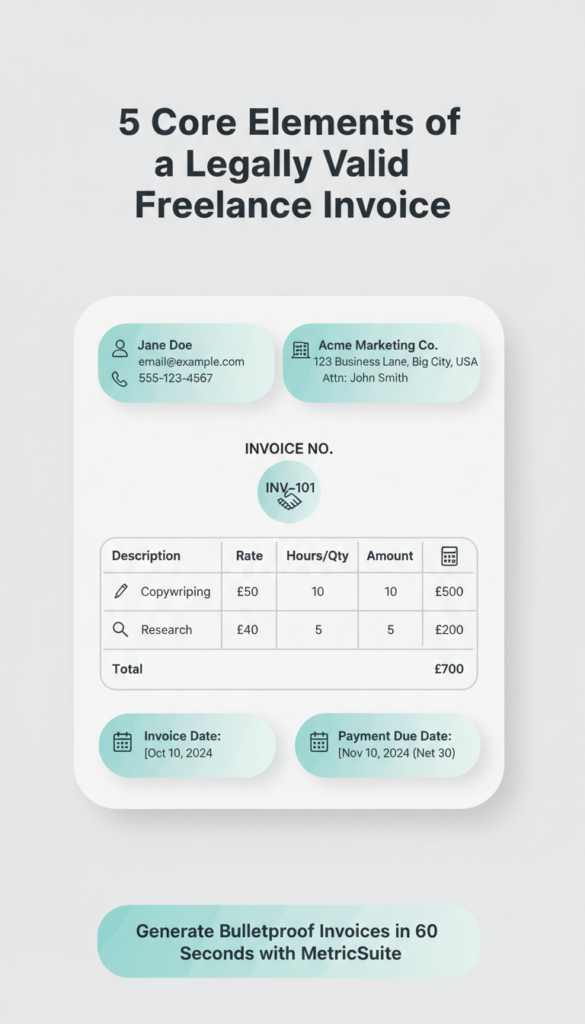
Your invoice needs five core elements:
- Your name and contact information. This can be your legal name or a business name (if using one). Include an email and phone number.
- The client’s name and address. Be specific; don’t just write “John at Marketing Co.”
- A unique invoice number. This helps you track payments and prevents duplicate submissions.
- Itemized description of services or products. Don’t write “Consulting work.” Write “Website copywriting: 5 pages @ $200 each = $1,000.”
- The invoice date and payment due date. Specify payment terms (e.g., “Due within 30 days”).
Optional but recommended: your tax ID (Social Security Number for sole proprietors, or EIN if you’ve applied for one), payment methods accepted, and late payment terms.
Common Misconceptions
You do not need a business license to invoice. Many freelancers believe they need one. In reality, most states don’t require it for service-based work unless you operate in specific industries like plumbing or contracting.
You do not need business registration to be legally compliant. A sole proprietorship exists without paperwork filing. You’re legally self-employed the moment you start earning income from freelance work.
You do need to report income on taxes. This is where invoices matter most. If you’re invoiced, you’re expected to report that income.
The MetricSuite Solution: Create Professional Invoices in 60 Seconds
Here’s the friction point for most freelancers: invoicing software costs $20–$50 monthly. You’re just starting out—you don’t need that overhead.
Enter the Free Invoice Generator.
MetricSuite’s Free Invoice Generator handles the heavy lifting without the price tag. It generates legally compliant invoices, stores them for your records, and works entirely in your browser (no logins, no data collection).
How to Create Your First Invoice in 3 Steps
Step 1: Fill in your information.
Go to https://metricsuite.tools/free-invoice-generator/. Enter your name, email, phone, and any business name you’re using. This becomes the “From” section of your invoice. The tool auto-saves everything for next time.
Step 2: Add your client and services.
Fill in the client’s name and address. Describe each service or product with quantity and rate. The tool calculates totals automatically. Add payment terms (e.g., “Net 30”) so the client knows when you expect payment.
Step 3: Download and send.
Generate a PDF or print-ready invoice. Email it to your client, keep a copy for your records, and you’re done.
Use the Free Invoice Generator Now →
(https://metricsuite.tools/free-invoice-generator/)
That’s it. No subscriptions. No abandoned invoices left in draft mode. No data sold to third parties.
Best Practices: Make Your Invoices Bulletproof
1. Use Consistent Numbering and Dating
Assign each invoice a sequential number (INV-001, INV-002, etc.). Include both the invoice date and the due date. This prevents confusion about when payment is expected and makes it easy to track overdue invoices. If a client claims they never received payment terms, you have proof.
2. Spell Out Payment Methods and Late Fees
Don’t assume your client knows how you want to be paid. Write it clearly: “Payment accepted via bank transfer, PayPal, or Stripe.” If payment is late, specify the consequence: “Payments not received by [due date] incur a 1.5% monthly late fee.” This discourages delay and gives you legal ground to charge interest if needed.
3. Archive Copies Locally
The Free Invoice Generator stores invoices in your browser, but you should also keep a copy on your computer or cloud storage. Create a simple folder structure (e.g., “2025/Invoices/Client Name/”) so you can find them fast during tax season or if a client disputes an invoice.
4. Update Your Invoice Template as Your Business Grows
If you add a tax ID, EIN, or business registration later, update your template. Consistency across invoices makes you look more professional and simplifies record-keeping.
Invoicing as a Freelancer: Your Legal Responsibility
Invoicing isn’t just a courtesy—it’s your proof of income. The IRS doesn’t care whether you have a registered business. They care that you report every dollar earned.
Here’s the reality: freelance income is self-employment income. You’re responsible for:
- Tracking all invoices (issued and received).
- Reporting gross revenue on Schedule C (Form 1040) or Schedule 1.
- Paying estimated quarterly taxes if you earn over $400 annually.
A professional invoice makes this simple. It documents what you did, when you did it, and what you were paid. It protects you against payment disputes and audit risk.
When you invoice properly, you’re not just protecting yourself legally—you’re signaling to clients that you’re serious about your work. Clients who receive professional invoices are more likely to pay on time, hire you again, and refer you to others.
The Bottom Line
You can absolutely invoice clients without a registered business. Freelancing exists in a legal gray zone only if you treat it that way. The moment you start issuing professional invoices, you’re no longer in a gray zone—you’re operating as a legitimate service provider.
The tool doesn’t matter as much as the habit. You need to invoice consistently, clearly, and professionally.
MetricSuite’s Free Invoice Generator removes the friction. No subscriptions. No complexity. Just you, your client, and a legally compliant invoice ready to send in under a minute.
Create Your First Invoice Free Today →
Stop leaving money on the table. Stop worrying about tax compliance. Start invoicing like a professional—today.
FAQ: Invoicing Without Business Registration
Q: Do I need a tax ID to invoice?
A: No. As a sole proprietor, you can use your Social Security Number. Adding a tax ID is optional but recommended if you want to keep your personal and business finances separate.
Q: Can clients refuse to pay an invoice from an unregistered freelancer?
A: No. An invoice is a legal request for payment. If your invoice meets standard requirements (who, what, when, how much), it’s enforceable—even from an unregistered freelancer.
Q: How long should I keep invoice records?
A: Keep invoices for at least 3–7 years. The IRS recommends 7 years for small business records. Your accountant will thank you.
Q: Is it legal to invoice without a business name?
A: Yes. You can invoice under your own name and still be legally compliant. A business name is optional for sole proprietors.
Q: What if a client requests an invoice but delays payment?
A: Send the invoice with clear payment terms and due dates. If payment is overdue, follow up in writing. A professional invoice gives you legal standing to pursue payment through small claims court if necessary.
Your invoices are the foundation of your freelance business. Make them professional. Make them clear. Make them count.
Start invoicing free now: https://metricsuite.tools/free-invoice-generator/